Launch price: $149 lifetime access — going up to $299 soon.

No coding required

Build WordPress plugins with AI.

Charge $500–$2,000 a build — even if you've never written code.

Launch price — going up to $299 soon as we add more projects.

✓ One-time payment · ✓ Lifetime access · ✓ 7-day money-back

Tanzeel Ur Rehman

Taught by Tanzeel Ur Rehman — bestselling Udemy instructor · 155,000+ students.

Only on WP AI Bootcamp A premium, hands-on course — kept exclusive, not on Udemy

Stop me if this is you

You need one feature. So why pay a developer every time?

Client asks → you go plugin-hunting

Install five plugins. None quite fit.

Every tweak needs a developer

Pay a freelancer. Wait days for a reply.

You turn down work you can't build

The project goes to someone else.

Copied snippets just break

And you can't tell why.

What if you could just build the feature yourself — no coding required?

From idea to shipped plugin — in 3 steps.

Learn the workflow once. Repeat it for every plugin.

1. Describe the feature

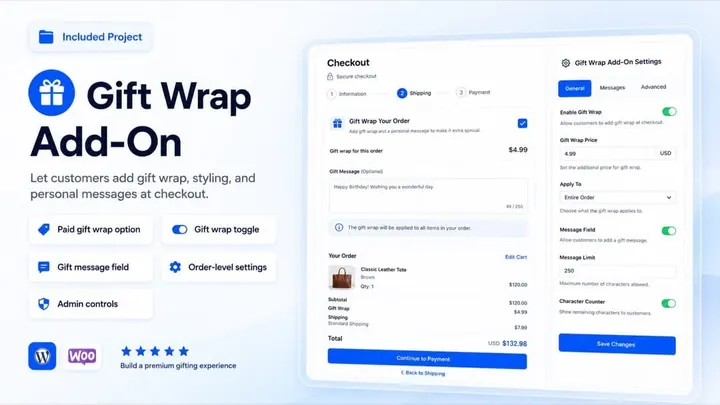
Plain English. Like: "Add gift wrap at checkout."

2. Claude builds it

Files, hooks, settings — generated and explained.

3. Test & ship the .zip

Debug, package, deliver.

What you will build.

Not random demos — real features clients pay $500–$2,000 to have built.

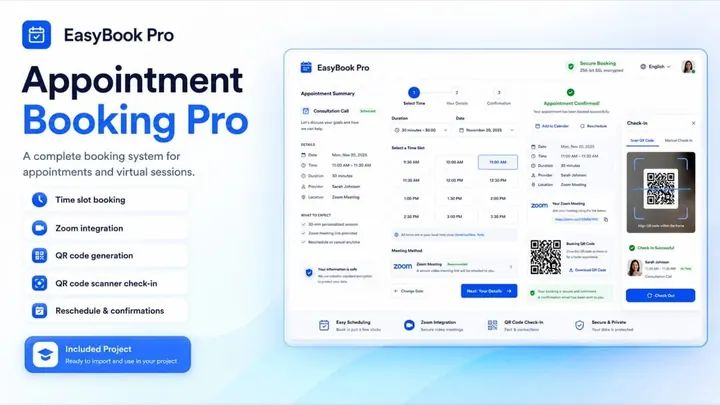
Appointment Booking Pro — booking system with time slots, Zoom links, and QR check-in
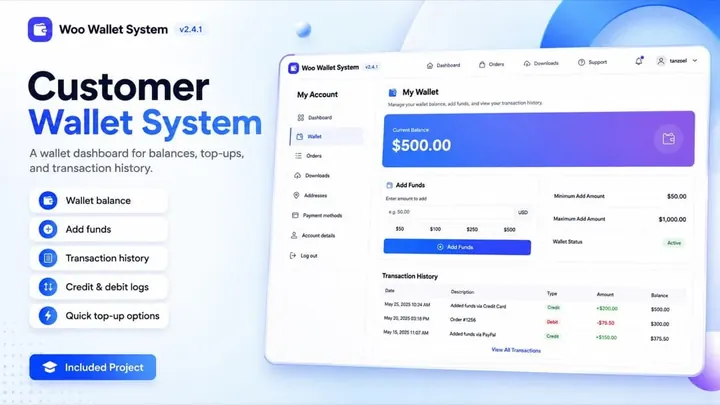
Customer Wallet System — balances, top-ups, and transaction history
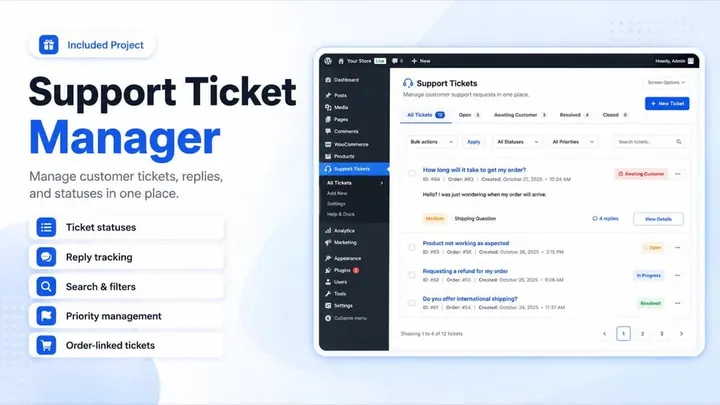
Support Ticket Manager — tickets, replies, statuses, and priorities
Gift Wrap Add-On — paid gift wrap and message at WooCommerce checkout
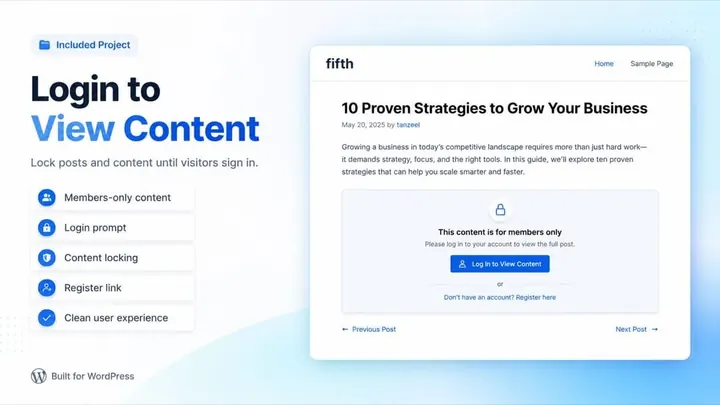
Login to View Content — lock posts until visitors sign in
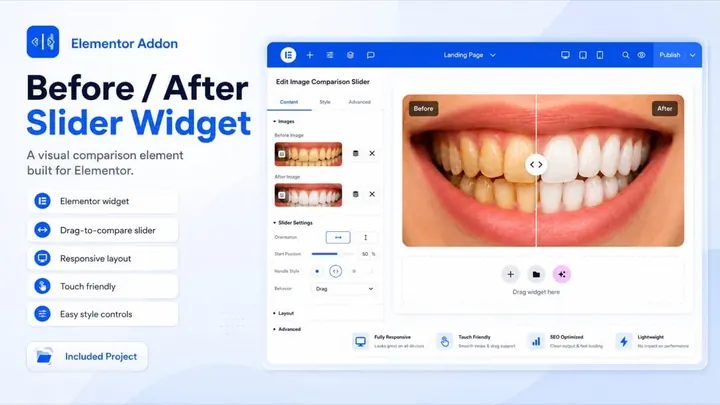
Before / After Slider — drag-to-compare Elementor widget

Curriculum

8 modules, 79 lessons, 25+ hours.

You start with small, confidence-building plugins. Then you move into WooCommerce, Elementor, Claude Code, context planning, and the full appointment booking project.

  • .zip files included
  • Prompt templates
  • Raw project files
7-day money-back guarantee

Go through the training. If it does not feel worth the investment, email within 7 days for a full refund.

  • 24:02
  • AI vs Google 15:52
  • Why Claude AI? 13:49
  • Workflow & Safety 12:43
  • How to set up a staging environment? 9:41
  • The plugin you will create 2:48
  • Adding Functionality (No Code) 15:19
  • Prompt + Code 0:51
  • Turn It Into a "Real" Plugin 20:56
  • Prompt + Code 6:20
  • Plugin Slug 6:31
  • What you will learn in this section? 1:31
  • HTML vs MS Word 21:40
  • How to change something in HTML? 13:04
  • CSS vs Elementor 14:08
  • How CSS is used? 26:01
  • How external CSS is added? 6:18
  • How to change CSS stylings in AI generated content 26:58
  • JavaScript 12:54
  • PHP 16:13
  • Why prompt engineering is important? 3:15
  • Treat Claude as a Developer, Not a Robot 3:35
  • Claude Prompt Template 9:36
  • Claude Prompt Template Article • 1:18
  • What you will learn in this section? 12:08
  • Gift Wrap at checkout Plugin 31:35
  • [important] How to handle errors + login to see prices plugin 29:23
  • User greet shortcode plugin 22:33
  • Creating an Elementor Widget 34:08
  • What you will learn in this section? 18:23
  • LLM vs Agentic AI 8:06
  • Why Claude Code 17:05
  • [Only for Windows Users] Install Git Bash 14:01
  • Claude Code Installation [Windows] 30:05
  • Claude Code Installation [Mac] 31:48
  • Terminal Basics 24:37
  • Lets create a WooCommerce Custom Payment Plugin 30:53
  • Claude Code Basics 26:37
  • Claude Code Visual Studio Extension (GUI) 6:41
  • WooCommerce Support System Plugin 43:48
  • How to extend plugin features? 36:38
  • Wallet System Plugin 31:06
  • How to continue with Claude Code after session limit is reached? 22:37
  • How to create an extension (pro version) of a plugin using Claude Code 37:28
  • Elementor Feature Plugin Using Claude Code 11:16
  • Elementor Dashboard Customizer Plugin 19:39
  • Why context engineering is important? 10:09
  • How CLAUDE.md file works? 15:32
  • How to manage context for bigger and complex plugins? 38:42
  • What is agent and how to create an agent? 17:04
  • Claude Code Skills (Requirement Generator) 37:02
  • How appointment booking plugin will work? 17:29
  • Creating the requirements.md file using Claude SKILL 35:26
  • Following the multi file workflow (context engineering) 7:13
  • Phase 1 & 2 Development 34:32
  • Phase 2 testing 8:36
  • Phase 3 Development + Testing 27:26
  • Phase 4 Development + Testing 34:40
  • Email + My Account Testing 46:30
  • Phase 5 Development 15:29
  • Claude Code missed time slots config 30:51
  • Phase 5 Testing: Voucher generation 21:44
  • Testing on a live server (QR Camera on mobile) 40:42
  • Zoom link & Staff Management Testing 30:58
  • Calendar Testing 33:29
  • Phase 6 development 7:48
  • Cancellation Functionality Testing 28:49
  • Reschedule Functionality (API to UI using Claude) 26:16
  • Using Claude to test API automatically 6:27
  • Reports Testing 20:32
  • Custom Final Changes 22:28
  • Internationalization and Accessibility 8:45
  • WordPress.ORG compliance 11:15
  • Unit Testing Document 4:41
  • How to create the final .zip file of your plugin using CLAUDE Code 6:33

Why it pays off

One client plugin pays for the whole course.

A single custom plugin from a freelancer costs more than this course — and you learn to build unlimited ones yourself.

$700+ per plugin from a developer
$149 once — build unlimited yourself

Land one client project and the course has already paid for itself — everything after that is profit.

Included free

Plus, you also get these.

Bonus 1

Claude Prompt Library

Copy-paste prompt templates for building, debugging, and extending plugins.

Worth $49
Bonus 2

requirements.md Claude Skill

The exact Skill that turns a feature request into a clean build spec.

Worth $79
Bonus 3

Plugin starter files

The full source for every project — reuse them on real client work.

Worth $1200

Fit check

This is for you if…

  • You want to offer custom WordPress plugin work to clients.
  • You own WordPress sites and keep needing custom features.
  • You want Claude to help you build complete plugins, not random snippets.

Meet your instructor

Tanzeel Ur Rehman

Hi, I'm Tanzeel.

I'm a bestselling, highest-rated Udemy instructor with 155,000+ students. I've spent years building WordPress, WooCommerce, and Elementor plugins for real clients — and this course teaches the exact workflow I use, on real projects you can install and keep.

  • Bestseller& Highest Rated on Udemy
  • 155,000+students taught
  • 150+plugins for real clients

FAQ

Questions worth answering before you enroll.

Yes. The course is built around plain English instructions, WordPress testing, and Claude-assisted debugging. You do not need to write PHP from scratch, but you do need to follow the process carefully.
YouTube gives you scattered snippets for one-off problems. This is a complete, ordered workflow — from understanding a feature request to building, testing, and delivering a finished plugin .zip — taught across 15+ real, client-grade projects with the full source files included. You're paying for the system and the shortcut, not random clips you have to stitch together yourself.
Yes. Clients pay for working features, not for which tool you used to build them. Most don't care if you wrote the code by hand or guided an AI — they care that the plugin works, it's tested, and they own it. The course teaches that complete process: understanding the request, building the feature, testing properly, and delivering a clean .zip.
Yes. The 15+ plugins you build become your portfolio — the exact thing clients ask to see before hiring. You can land your first paid project (on Upwork and elsewhere) just by sharing the plugins you build in the course.
It will sometimes. That is why the course covers testing, error handling, debugging prompts, context files, and safe development environments. The skill is learning how to guide and correct the build.
You can start small, but larger Claude Code projects may require a paid plan. The course explains when upgrading makes sense and how to keep tool costs tied to real project value.
Most students can build a simple working plugin in the early modules. The larger WooCommerce and booking projects take more time because they teach a more professional process.
A computer (Windows or Mac), a WordPress install you can experiment on (local or staging — the course shows you how to set this up), a Claude account, and a browser. That is it. You do not need a code editor background, paid hosting, or any prior plugin tools.
Yes. You can email questions about course material and get help debugging your plugin builds. Most issues are also covered directly in the troubleshooting and error-handling lessons, so you will rarely be stuck without an answer in the videos themselves.
Yes. If you go through the material and decide it is not worth your investment, you can request a refund within 7 days.

Try it risk-free for 7 days

Go through the training and build a plugin. If you don't think it's worth it, email me within 7 days for a full refund — no questions asked.

Enroll today

Start building plugins you can use, show, and sell.

For $149, you get the course, the project library, and a practical way to start charging clients for custom WordPress features. Launch price — going up to $299 soon.

$149 $299

Try it risk-free — 7-day money-back guarantee, no questions.

8 modules, 79 lessons 15+ plugin projects Lifetime access Future updates included free

© 2026 WP AI Bootcamp. Operated by Atsyc Corpration Ltd